



Estimated Shipping App for Shopify
Increase conversions by displaying shipping estimate and order countdown timer on Shopify product pages. Compatible with the most popular Shopify themes.


Shopify Product Page Shipping Calculator
A powerful Shopify product page shipping calculator (also known as a delivery cost estimator) by Calcurates lets you show shipping cost on Shopify store's product page directly—helping customers make faster, more confident purchase decisions.
With a built-in Shopify shipping calculator on product page, your Shopify store shows shipping on product page in real time, including the cheapest and fastest delivery options. This Shopify product page delivery calculator also enables your Shopify store to display free shipping on product page, making promotions more visible and impactful.
Using a smart shipping estimator, customers can instantly check available shipping methods, rates, delivery times, and even in-store pickup options—without leaving the product page. Your Shopify store will display delivery estimate on product page with an order countdown timer to create urgency and boost conversions.
By adding a Shopify product page shipping calculator, you improve transparency, reduce cart abandonment, and increase your chances of turning visitors into customers.
With a built-in Shopify shipping calculator on product page, your Shopify store shows shipping on product page in real time, including the cheapest and fastest delivery options. This Shopify product page delivery calculator also enables your Shopify store to display free shipping on product page, making promotions more visible and impactful.
Using a smart shipping estimator, customers can instantly check available shipping methods, rates, delivery times, and even in-store pickup options—without leaving the product page. Your Shopify store will display delivery estimate on product page with an order countdown timer to create urgency and boost conversions.
By adding a Shopify product page shipping calculator, you improve transparency, reduce cart abandonment, and increase your chances of turning visitors into customers.
64% of customers
looked for shipping costs on the product page before adding a product to the cart according to Baymard research
looked for shipping costs on the product page before adding a product to the cart according to Baymard research
🚩 Challenge
By default, Shopify doesn't show shipping costs on the product page. But for the majority of customers, having an idea of the full order cost is crucial for making a purchasing decision on the product page.
💡 Solution
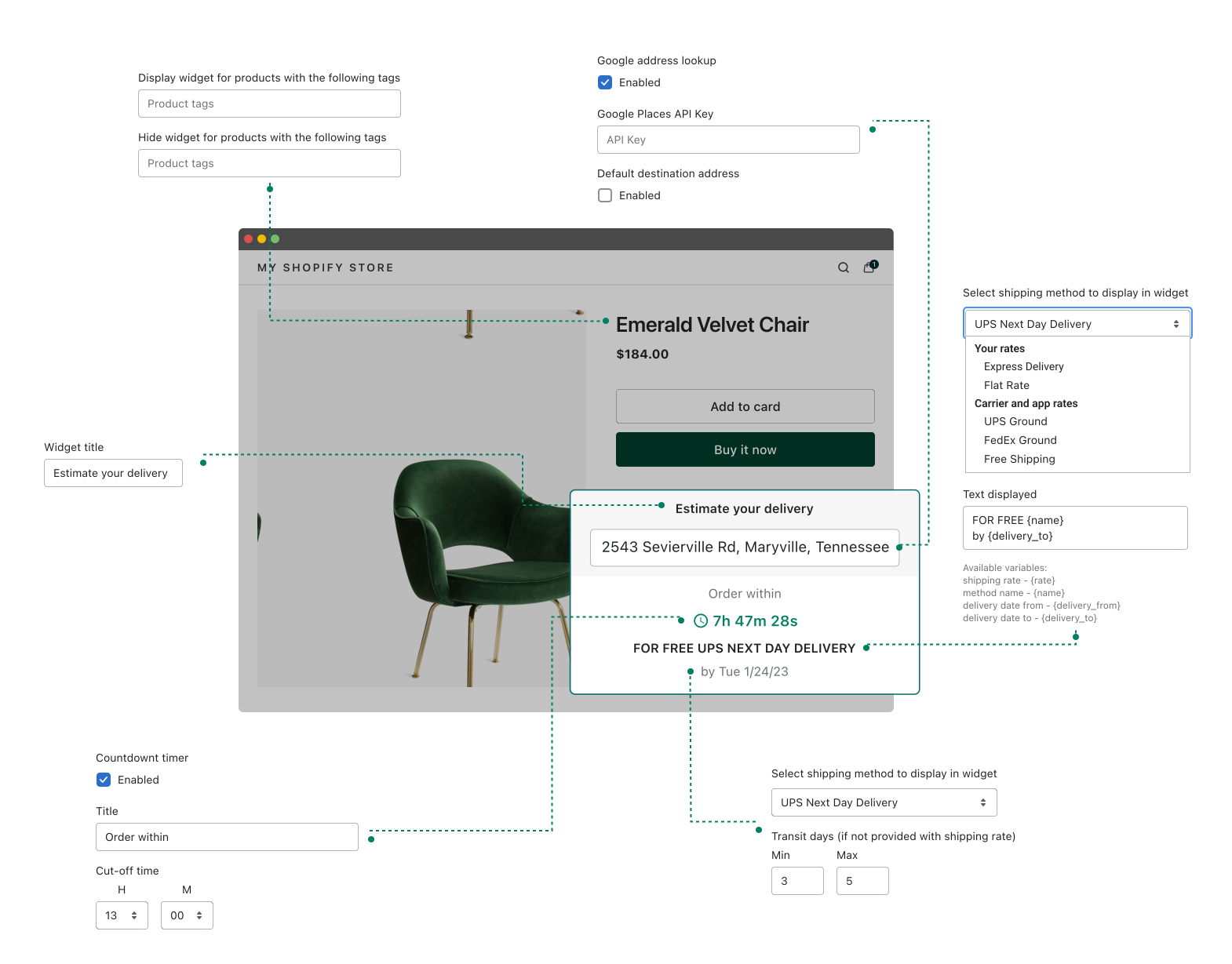
The Shopify shipping calculator on product page app is embedded as a widget and displays shipping cost estimate as well as order countdown timer directly on the selected product pages. It works with existing Shopify shipping methods including ones from 3rd party apps.
App Features
- Choose from existing shipping methodsThe app displays existing Shopify shipping methods including methods set up with 3rd party apps.
- Enable Google address autocompleteThe widget is powered with Google address autocomplete for easy address lookup.
- Increase urgency with countdown timerSet up the cut-off time and display countdown timer such as "Order within 1 hour, 39 minutes, 22 seconds".
- Set transit daysFallback transit days can be set if they are not provided with shipping methods.
- Display or hide widget for certain productsThe widget can be displayed on all pages or on specific pages restricted by product tags.
- Customise texts, titles and placementTake full control over the widget texts, titles and placement.
Pricing
Try 7 days for free with all features included
Basic
$7.99
per month
Pro
$29.99
per month
Product Page Shipping Estimations for Shopify — FAQs
Popular questions answered
Shipping can be shown on a Shopify product page by adding a shipping estimate widget or app that displays available methods, shipping costs, or delivery timing directly on the product page.
Shipping cost is shown on a Shopify product page by using a product page shipping calculator that estimates rates before checkout. This helps customers understand the full order cost earlier in the buying journey.
Free shipping can be displayed on a Shopify product page by showing a delivery message or shipping widget that highlights when a product qualifies for free shipping. This can help improve clarity and conversion.
A delivery estimate is added to a Shopify product page by embedding a shipping or delivery widget that calculates expected shipping timing and available methods based on the customer’s location.
Estimated shipping before checkout in Shopify is shown by displaying shipping methods, shipping costs, or delivery timing directly on the product page instead of waiting until cart or checkout.
Shopify doesn't offer a built-in shipping calculator for product pages, but with Calcurates, you can easily display estimated shipping rates before checkout. By integrating Calcurates' Shipping on Product Pages app, customers can input their location and instantly see real-time rates, estimated delivery dates, and available methods—all powered by connected carriers. This improves transparency and helps reduce cart abandonment.
To add a shipping calculator with custom code, you’ll need to:
- Enable Carrier-Calculated Shipping in your Shopify plan (required for accessing shipping rates via API).
- Use Shopify’s AJAX API to fetch the customer’s shipping address and cart details.
- Call the Shopify CarrierService API (or your third-party shipping provider’s API) to retrieve real-time shipping rates.
- Display the rates dynamically on the product page using JavaScript.